Hey folks 
We have a new beta out today — Copenhagen. You can download it from sketch.com/beta or open your existing beta build and follow the prompts to update.
This update is our major redesign for macOS Tahoe, along with a full rewrite of the Inspector. As you can imagine, we’re shipping this beta with a few known issues (nothing major, though) and we hope you’ll help us squash a few more before the final release.
With that, please create backups of any documents before you open them and let us know if you see anything that doesn’t look right. You’ll find release notes over on the beta page, but if you’re interested, here’s a bit more detail and backstory behind this release.
We’re a little later than we’d hoped to be with this, and for a couple of good reasons:
- We always want these redesign updates to be more than a fresh coat of paint. They have to improve functionality, too.
- With any major macOS redesign, we spend time figuring out what to adopt and what to go custom on — this release was no different.
Let’s get the details — starting with what’s new.
A rewritten Inspector
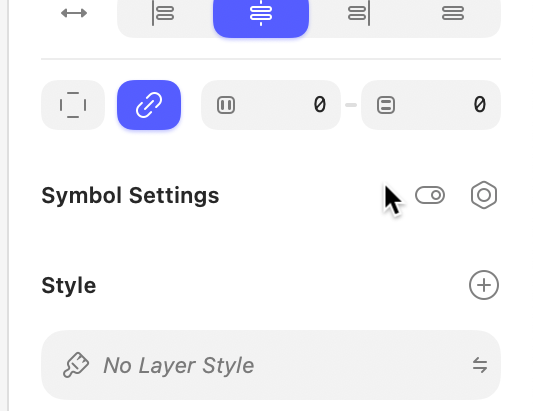
The Inspector isn’t just a redesign, it’s a from-scratch rewrite. Lots to say about this and I can’t cover it all here, but the biggest change is most popover menus have been replaced with floating panels you can freely move (including for colors, which we know has been a longstanding issue).
The new colors panel has lots of nice improvements; variables have their own tab, blend modes are part of the panel, it’s easier to switch between RGB/HSB/HSL values, gradient presets get their own dedicated view, it’s easier to choose color variables when editing gradient stops.
Pretty much every control in the Inspector is now custom. This allowed for; scrubbing text fields without focusing them, scrubbing support for numeric fields (and pretty much any single-digit input), more consistent multi-selection handling (and proper mixed states), double-clicking sliders to reset to their ‘natural’ value, holding down ⌥ to access alternative functionality (such as quickly removing fills — try it!).
A new, contextual toolbar
Beyond the custom Liquid Glass, the new toolbar is contextual, and changes depending on what you’re doing and what you have selected. We’ve also moved a number of tools from the Inspector to here (such as vector editing tools) because tools = toolbar.
It’s worth knowing that with this, you can’t customize the toolbar anymore, but hopefully you’ll appreciate having the right tools, at the right time, at the top of the Canvas, without having to think about it.
A clearer, focused layer list
The layer list has new iconography (in fact, everywhere has new iconography — there are well over 700 new icons!) and path lines to make your document’s layer hierarchy easier to parse.
There’s also new focus mode which filters the layer list to only to show only siblings and the parent container(s) of the layer(s) you’ve selected. It also collapses containers and groups automatically.
This focus mode is enabled by default, but you can toggle it off (to see all layers at all times) by clicking the icon at the bottom of the layer list next to the search field. Or type “Focus layer list” in the Command Bar.
Wrap for stacks
A much-requested feature when we launched stacks. You can now set items in a stack to wrap when their combined height (for vertical stacks) or width (for horizontal stacks) exceeds their container’s fixed dimensions. You can also choose how items that wrap align.
Image background removal
You can now remove backgrounds from images using two new tools: one for images with objects in the foreground, and another for images with people. Both use Apple’s on-device, machine learning frameworks.
Many more smaller improvements
There a bunch of smaller improvements we’ve made in this release — and the groundwork we’ve laid with the rewrite of the Inspector especially makes it a lot easier to keep making improvements going forward. You’ll find details of these in the release notes.
Alright, now you know what we’re shipping, let’s talk about how we got here…
The story behind the redesign
First up, inset sidebars. You’ll have seen those around Tahoe already and probably have your own opinions on them. We spent some time prototyping how these could work but ultimately decided they’d add too much noise to the editor. In the end, we cooked up a custom implementation that gives us some nice symmetry around the Canvas.
Next, Liquid Glass. We shipped our own Glass effect as quick as we could after WWDC to allow others to design with it — and also for us to test how it could work in our redesign. In the end we brought it to the toolbar and went a little custom. For example, we removed the dynamic shadow, which wasn’t really working in the context of our Canvas.
Finally, document tabs. These were tricky because the standard Tahoe implementation really didn’t play well with Sketch. We also explored a custom implementation which didn’t feel much better. In the end, we came up with including document tabs above the layer list in the sidebar. This took a moment to get used to, but ended up feeling really natural.

By the way, document tabs now have a Sketch-specific setting which we enable by default in Copenhagen. If you prefer to open documents as separate windows, you can switch to this in Sketch’s settings.
That’s it for now. Do check out the full release notes on sketch.com/beta and let us know about any bugs you run into. As ever, and once again, make backups of your documents before you open in them in a beta.
Thanks!
P.S. To save the replies below becoming hard to follow, please report any bugs you find in Share an issue — thanks!