After years of problem free designing, this week Sketch has been nothing but problems for me (even with all plugins deactivated).
I can’t move layers, I can select objects by dragging the cursor, it’s lagging several seconds behind and more. It’s just been very unpleasant to work with all week.
Is is just me? Has anyone else noticed anything similar?
PS - I’ve already reached out to support as I can’t even drag/move layers into existing groups, which is preventing from getting work done.
Hi Diego, I am not convinced its Sketch itself but I’ve been unable to identify the source just yet. I’ll keep debugging and update you when I have something to share.
I’ve been holding off on reporting some issues I had because they’re hard to pinpoint. But I had cases of having my cursor offset from the layer it’s dragging. It’s not exactly a lag because the layer(s) never catch up to the cursor’s position, it stays offset I believe.
And sometimes I have very laggy undo, especialy relating to stacks. This one is perhaps older than 2025.2.4
I remember we fixed an issue recently related to the Undo action (⌘Z), but it should be working properly in 2025.2.4 (and definitely in our newest beta - Copenhagen). Are you still seeing this happen nowadays?
As for the wrong cursor position moving layers… Totally unexpected! If you can reproduce it consistently, I’d love to see a short screencast.
You can share it here, or if you prefer, send it over to us at productsupport@sketch.com, and we’ll continue troubleshooting from there. Totally up to you!
Thanks a lot for the video, it shows the lag and offset very clearly!
We’ve been performing many tests, and I have one scenario that I would like to run by you.
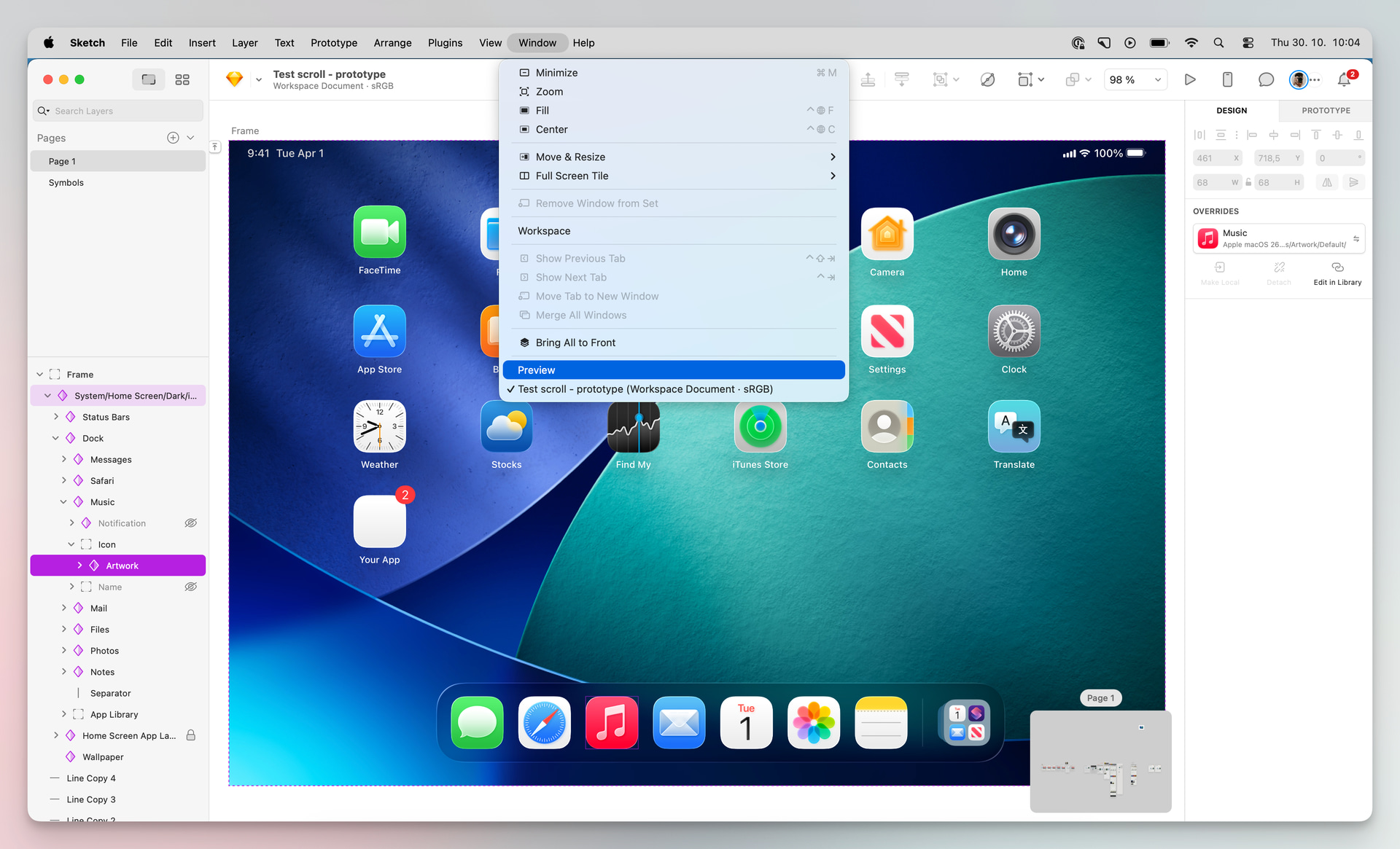
We realized that having a Preview window in the background triggered the behavior you mentioned. So, the next time you find yourself in this situation, could you verify if one of these windows is open somewhere? If so, close it and recheck.
You can easily do it by going to the Menu Bar > Window, and see if there is a “Preview“ there. If so, click on it to bring it to the front and close it:
Hey @Gael , I almost missed your reply. If you’d like, you can send that copy to us at productsupport@sketch.com, and I will review it and conduct further tests with it.
Yes. I have been using Sketch for probably a decade now and am super frustrated. Layers are randomly disappearing for me (Mac OS), not staying attached to their artboards even though they’re supposed to be within them and are reordering themselves. I had a horrible time trying to show off something as simple as low-fidelity wireframes, which were fine until I went to present and all the layer order has shifted, making most of the content completely invisible.
Features aren’t worth Sketch no longer being a viable product, and that’s where I am personally.
What version of MacOS are you running? Upgrading to MacOS Tahoe made a world of difference for me (with Sketch). If you can’t upgrade, perhaps try rolling back to a prior version of Sketch.
Thanks a lot for jumping in and sharing your experience, and thank you @Brad for the kind words and for helping out in the thread!
That definitely doesn’t sound right, and I’d love to help figure out what’s going on with those disappearing or shifting layers. Could you let me know which version of Sketch and macOS you’re currently running? Also, if possible, what hardware are you using (just to get the full picture)?
Do you notice this happening in all your documents, or only in a few specific ones? And is it something that happens consistently (like you can reproduce it every time), or more randomly? If you can capture a quick screen recording of it happening, that would help us greatly in narrowing down the issue.
Once we know a bit more about your setup, we’ll dig into what’s causing this and get things stable again for you