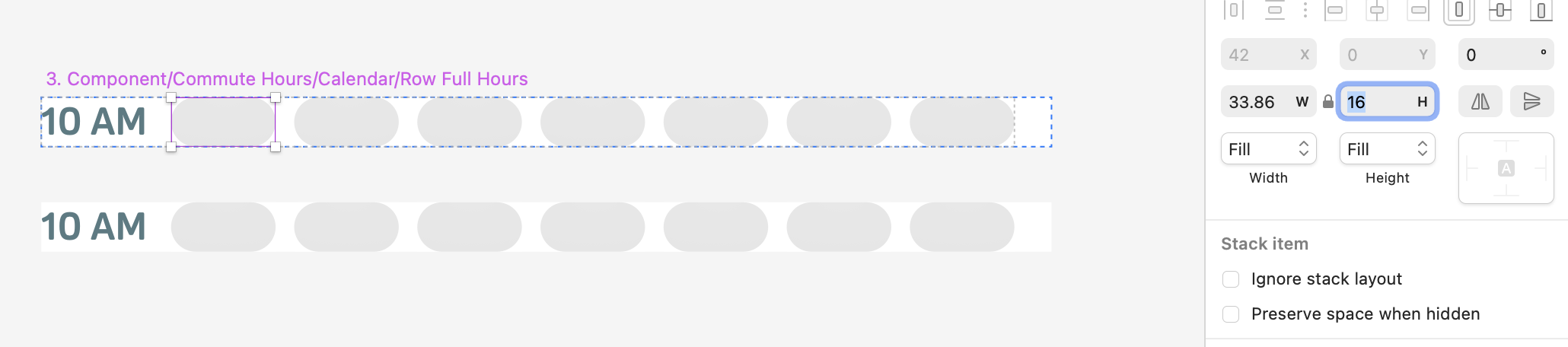
There’s a very annoying inconsistency in the stack behaviour.
When a layer’s proportions are locked and set as “Fill” in a fixed-width/fit-height stack, the height of the layer won’t update according to the width making the lock proportions useless.
The expected behaviour would be to keep the lock proportions effective so if we change the with of the stack the content set as Fill will adjust proportionally.
Unfortunately, it doesn’t work any better for me. I cannot reproduce what you get. And also, I need the text layer fixed so even if it would work, it doesn’t really solve my problem.
Let’s say you delete the text layer on the example. What do you get?
I get this - and as you can see the stack didn’t resize to reflect the proportion of the squares.
The squares collapse because when you set direct children of stacks with Fill, all will have the same size. In this case, the squares collapse to the height of the text layer because the text is not set to Fill height. Setting the layer’s height to Fill fixes the issue.
You can also set the text to have Fixed width to add more text if needed.
I don’t know how you arrived at the third scenario with no text. I included an example in the file I attached. Take a look and let me know if I missed anything.
If you could share more details of what you want to build and the behavior you need, I can provide a more complete answer. For instance, you can also nest the text and the squares inside additional stacks, but that depends mainly on what behavior you need.
Hi Jorge! I’m having the same issue as alice here, here’s a video of the issue. When resizing my instance I’d like my 2 red shapes to always retain square proportions. Is there a way to achieve this?
I would expect that to happen when “lock proportions” is enabled. Does that make sense?
If that has too many implications on your end then maybe it would make sense to add a 2nd lock between the 2 sizing behavior menus right below.
This is currently not possible. You’re looking to resize proportionally regardless of the stack settings. In your setup, the Fill rules take over and resize the stack items (the squares) to fill the width, height, or both; depending on how you resize the instance.
Scaling (⌘K) will get you the result you want and I’m pretty sure you’ve tried it (or are aware of it) so I wanted to ask if scaling is not an option for you.
Yes indeed Scaling doesnt work in our case. The use case is how the grid adapts to various device screen sizes (so giving the frame different dimensions).
Also I think Scaling will scale the spacings as well, which is not something we want.
I’ll go ahead and post this as a feature request then!
Curious if there is any progress on this request, I’ve bumped into this a few times and always expect the aspect ratio lock to work in resizable layouts. If it’s not possible please disable the aspect ratio (or remove) control in the UI.
There’s been no changes regarding this. The feature is possible and we want to build it, but we don’t have defined yet when we’ll work on it.
The current UI control is still shown so you can resize the stack item: shape, symbol or stack, proportionally (or not). This lock control does not have an effect when you resize the parent stack, which is the desired effect. And I can clearly see how that piece of UI is confusing when working with stacks.
The only current way to resize with the same aspect ratio is to use the Scale tool (K). You can also try the method described in this topic, but you’ll see some differences in sizing.