The CLI and file format documentation are somewhat outdated since the 2025.1 release:
They both mention artboards.
I have a script that alters a Sketch document via your TypeScript package. Then I do an export via sketchtool. So it’s not a plugin that is running inside Sketch, it is purely done by altering the .sketch file (outside Sketch) and run an export on the command line.
This works. But I never got the smart layout to work if I change the text content of a container (for example replace the text with a longer text and let the container grow, the behavior inside Sketch).
I hoped the 2025.1 (or 2025.2) with frames would fix that. The same script still works with frames. I can replace text inside a frame via the script. But there is no recalculation of the size of the frame. A recalculation of width and height only seems to happen inside the Sketch app itself (on the layer that has been edited), not via sketchtool.
An extra parameter on the CLI to force a recalculation of all the frames would be great for my usecase. For example: sketchtool export artboards my-altered-file.sketch --output=./export --force-recalculation
So I’ve been thinking about this problem for a while now and I believe I have a solution, albeit it’s a bit more involved than I’d like.
The basic idea is: if we can’t trigger layout re-calculation without getting Sketch.app involved, let’s get it involved?
There’s this new (2025.2) sketchtool run-script command that can run arbitrary JS code right inside Sketch via CLI. Here I’ve thrown together some JS code that triggers re-layout of all top-level frames (aka artboards) to accommodate their resized children:
const { Document } = require('sketch/dom')
const { find } = require('sketch')

Document.open('/path/to/document.sketch', (err, document) => {
	if (err) {
		return
	}
	find('Artboard', document).forEach((frame) => {
		if (frame.layers.length > 0) {
			// Step 1: simply querying this property
			// will mark the layout as needing update
			_=frame.layers[0].horizontalSizing
		}
		// Step 2: actually requesting "Size to Fit"
		frame.adjustToFit()
	})
	document.save((err) => {
		document.close()
	})
})
And of course to actually run via sketchtool we need a helper Bash script (could also be a JS/TS script, doesn’t matter really):
#!/bin/bash

DOC="~/Desktop/self-sizing-patched.sketch"
SKTOOL="/Applications/Sketch.app/Contents/MacOS/sketchtool"
SCRIPT=$(cat <<EOF
const { Document } = require('sketch/dom')
const { find } = require('sketch')

Document.open('$DOC', (err, document) => {
	if (err) {
		return
	}
	find('Artboard', document).forEach((frame) => {
		if (frame.layers.length > 0) {
			// Step 1: simply asking for this property
			// will mark the layout as needing update
			_=frame.layers[0].horizontalSizing
		}
		// Step 2: actually requesting "Size to Fit"
		frame.adjustToFit()
	})
	document.save((err) => {
		document.close()
	})
})
EOF
)

$SKTOOL run-script "$SCRIPT" --without-activating
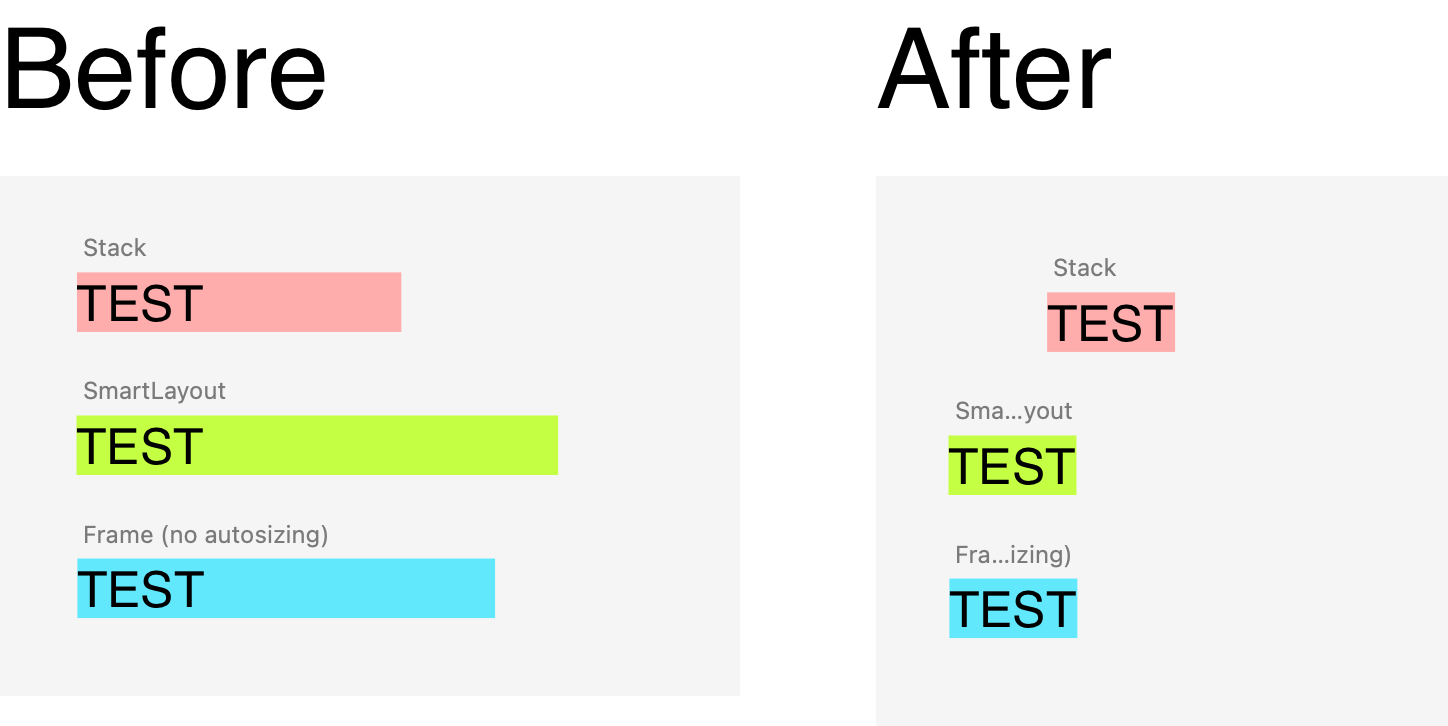
And here’s the result of running this script on the following test document
I’ve got it working within my Node app. It still has some weird flaws because other problems, probably not related to this. Some weird cropping on the root frame (probably caused by something in my document itself) and the images disappeared (I manually add those in the .sketch file, but it did work that way before). I’ll spend some extra time on it to figure out what happens, this is already a good step forward.
Here is an updated version I run from Node, with a recursive function to touch every frame in the document:
import { exec } from 'child_process'

const runSketchAdjustScript = (uuid: string) => {
  const outputDocumentPath = path.resolve(`./temp/${uuid}/output.sketch`)
  const script = `
  const { Document, GroupBehavior } = require('sketch/dom')
  const { find } = require('sketch')

  // Recursive function to adjust Frames
  function adjustFramesRecursively(container) {
    // Check if the container is a Frame
    if (container.groupBehavior === GroupBehavior.Frame) {
      if (container.layers.length > 0) {
        // Trigger layout update by accessing horizontalSizing
        _ = container.layers[0].horizontalSizing
        // Apply adjustToFit
        container.adjustToFit()
      }
    }

    // Recursively process all child layers that are groups
    container.layers.forEach(layer => {
      if (layer.type === 'Group' || layer.groupBehavior === GroupBehavior.Frame || layer.groupBehavior === GroupBehavior.Graphic) {
        adjustFramesRecursively(layer)
      }
    })
  }

  Document.open('${outputDocumentPath}', (err, document) => {
    if (err) {
      console.log('Error opening document:', err)
      return
    }

    // Find all top-level Frames (formerly Artboards)
    find('Artboard', document).forEach(frame => {
      adjustFramesRecursively(frame)
    })

    // Save and close the document
    document.save((err) => {
      if (err) {
        console.log('Error saving document:', err)
      }
      document.close()
    })
  })
  `

  console.log('Running Sketch adjust script for artboards', outputDocumentPath)

  return new Promise<void>((resolve, reject) => {
    exec(`./app/Sketch.app/Contents/MacOS/sketchtool run-script "${script}" --without-activating`, (error, stdout, stderr) => {
      if (error) {
        console.error('Error running sketchtool script:', error, stderr)
        reject(error)
        return
      }
      console.log('Sketch adjust script completed:', stdout)
      resolve()
    })
  })
}
I still hope the Sketch team adds a simple extra parameter in the sketchtool to trigger a re-layout on the whole document. That would make my solution a lot better maintainable, but for now I think I can get this to work
Nice to see this approach working (at least to some degree)!
May I suggest a quick improvement for the JS code? Since you want to iterate both top-level (artboards) and nested Frames, something like this find query might be useful:
find('Frame', document).forEach(frameOrGraphic => {
  // this will find all Frames and Graphics in the document recursively
})
Some weird cropping on the root frame (probably caused by something in my document itself) and the images disappeared (I manually add those in the .sketch file, but it did work that way before). I’ll spend some extra time on it to figure out what happens, this is already a good step forward.
This makes me wonder: have you considered replacing your direct .sketch file manipulations with a JS code (to be run via sketchtool run-script) that does the same? This is only a theory, but from my experience using the JS API usually produces more predicable results vs modifying the underlying JSONs manually.